01. Navigate to iPhone 'Settings'.
02. Scroll down and tap on 'Mail'.
03. Tap on 'Accounts'.
04. Select your existing BAMA email account.
05. Scroll to bottom of page and tap 'Delete Account'.
06. Accept the 'Remove contacts' and 'Remove calendar' etc from phone warnings if they appear.
07. After deleting the existing account, it should return you back to the 'Accounts' screen per step 3.
08. Tap 'Add Account'.
09. Tap 'Microsoft Exchange'.
10. Type in your email address in both 'Email' and 'Description' fields. Tap Next.
11. At the prompt 'Sign into your 'bama.net.au' Exchange account using Microsoft?' prompt, tap 'Sign in'.
11a. A browser window will open up to 'https://login.microsoftonline.com/......'
11b. Username will be your email address.
11c. Password is the same as you use to log into your computer.
11d. Accept 'Permissions requested' screen.
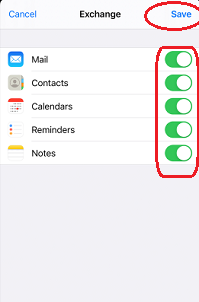
12. Ensure all mailbox items are selected (toggled green = selected per screenshot below) AND click 'Save'.