
- Download attached .rdp file, save it to somewhere easily accessible (eg: your desktop)
- Locate the downloaded .rdp file, open it
- When prompted for credentials, click on "More Choices" as shown below..
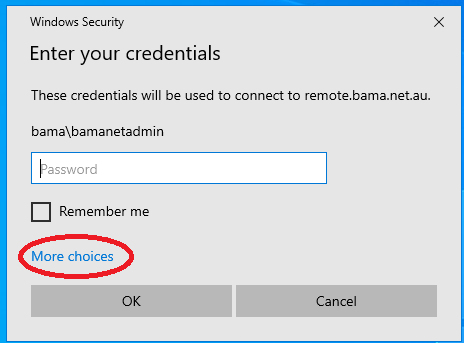
- Click "Use a different account
- In the Username field, input BAMBA\yourusername. For example : my username is gbrowne I would enter... BAMA\gbrowne
- Enter your login password in the password field.
- Click "ok" and accept any warnings regarding certificates etc.
Access BAMA RDP (2022) version Print
Modified on: Tue, 11 Oct, 2022 at 11:42 AM
Did you find it helpful? Yes No
Send feedbackSorry we couldn't be helpful. Help us improve this article with your feedback.