Default settings on the new Scanner app can only be changed from the operation panel.
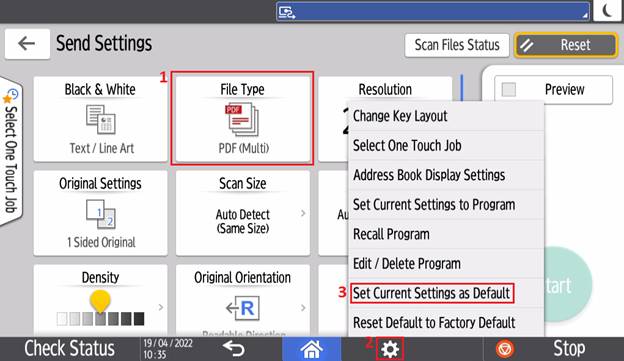
Press ‘Send Settings’ > change the ‘File Type’ setting to ‘PDF Multi-page’ > press the gear icon > ‘Set Current Settings as Default’

Modified on: Thu, 19 Oct, 2023 at 2:41 PM
Default settings on the new Scanner app can only be changed from the operation panel.
Press ‘Send Settings’ > change the ‘File Type’ setting to ‘PDF Multi-page’ > press the gear icon > ‘Set Current Settings as Default’
Did you find it helpful? Yes No
Send feedback