
The Vodia app allows you to access your desk phone account remotely from your mobile phone.
This allows you to make and receive calls, along with a range of other management options to control how your Desk Phone operates.
In order to Install the App Please follow this guide.
- Download the Vodia App..
- From the Google Play Store (Android Devices Only) - Vodia Phone – Apps on Google Play
- From the Apple App Store (Apple Devices Only) - Vodia Phone on the App Store (apple.com)
- On your laptop - Log into the Vodia Portal. The address is - https://capeyorkpartnership.nexttelecom.com.au/
- Log into the Vodia Portal using your extension number (this is your 4 digit extension such as "7250") and your password, if you do not know your password, please contact IT support to have it reset.
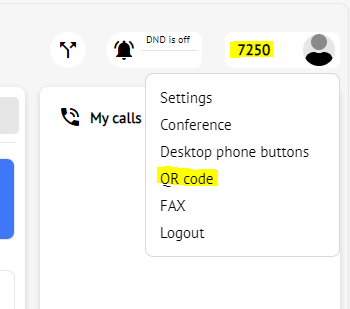
- Once Logged in, identify the extension number in the top right-hand corner, then click on the "QR code" Link.
- Open your Vodia app on either your iphone or android device, allow requests for access to devices and notifications.
- Click on "Scan Code" and scan the code displayed on your laptop.
This now completes the process!