
Services
Restart and check Services..
- On svrcyhbp01.cyh.local, run mmc.exe and load services from the local machine.
- In services look for these services, its recommended to restart all 3 if you are having issues...

Certificates
- Again, on svrchbp01.cyh.local run mmc.exe, load Certificates and then select "Computer account"
- Select Local computer, leave checkbox unchecked, click finish.
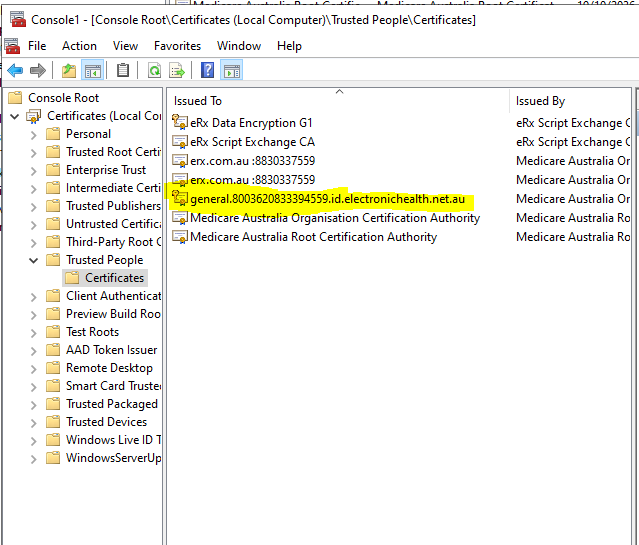
- In Certificates, go to folder "Trusted People" and "Certificates"
- Identify:
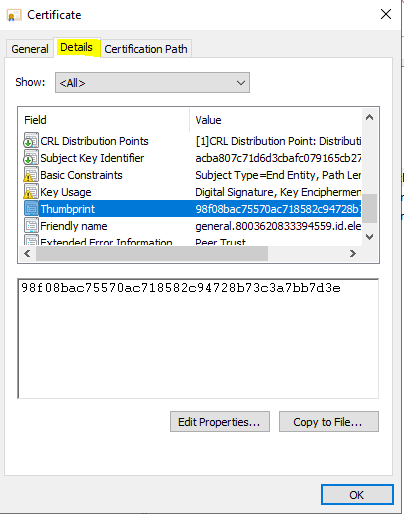
- Open the certificate, go to the details tab and identify "Thumbprint"
- Run eRxsetup.exe (icon on desktop on srvcyhbp01)
- Open "Setup Users"
- Compare the Thumbprint for all users, they should match the certificates thumbprint.
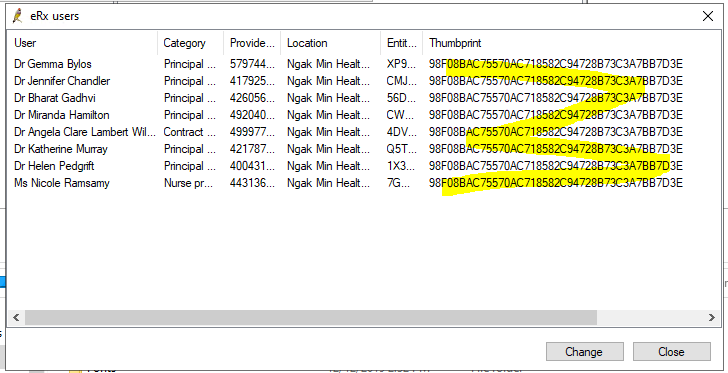
If they don't please follow these steps...
- Go back to the certificates opened in mmc.exe, close the certificate properties window if it is still open.
- right click on the certificate from previous steps, go to "All Tasks" and export certificate.
- Click "Next"
- Click "Yes, export the private key"
- Leave settings on Default, click "Next"
- Enable Checkbox "Password" Create a 4 digit code for the password, make sure to remember the password, you will need it later.
- Create a file, remember the location you put the file.
- Click "Finish"
- Go back to erx setup, for the affected user(s), open their record by double-clicking.
- click on the "..." icon next to "Enter the certificate file to use:
- Locate the .pfx file where you saved it in step 7.
- Enter the password you created in step 6.
- Click "Save"
- Close "eRx users.
- Close "eRx Setup"
- This should close erx setup and then run some commands to restart the erx services.
BP Support
Failing the above, my next suggestion is to call BP support on 1300 40 1111. Site ID is 16417. They will usualy fix most standard erx issues.
Erx Support
If all of the above fails, including BP support, try erx support for more advanced diagnosis / support : support@erx.com.au
Phone : 1300 700 921
Contact us - eRx Script Exchange